Read
Every word timed
- Skim an hour of audio in minutes
- Names and terms your way
- Find the quotes you need
Turn Arabic audio into text you can read, search, edit and export. FlowCut transcribes Arabic interviews, podcasts and recordings inside Premiere Pro, timed word by word.
No card required. Just your email.
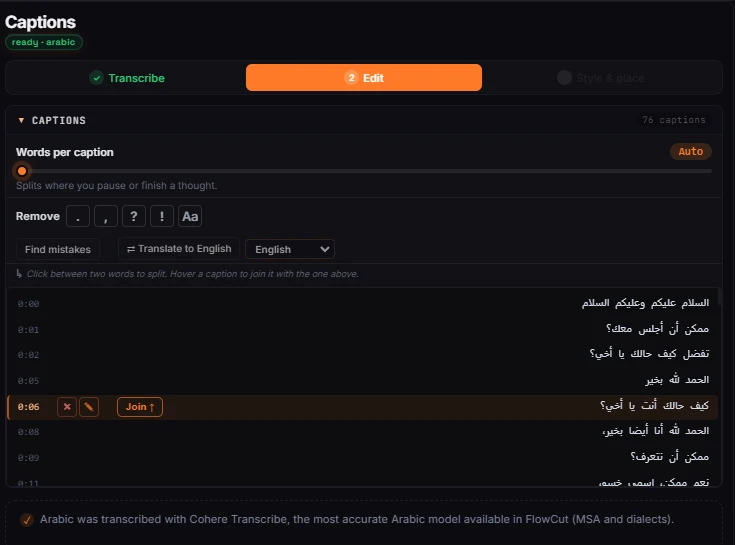
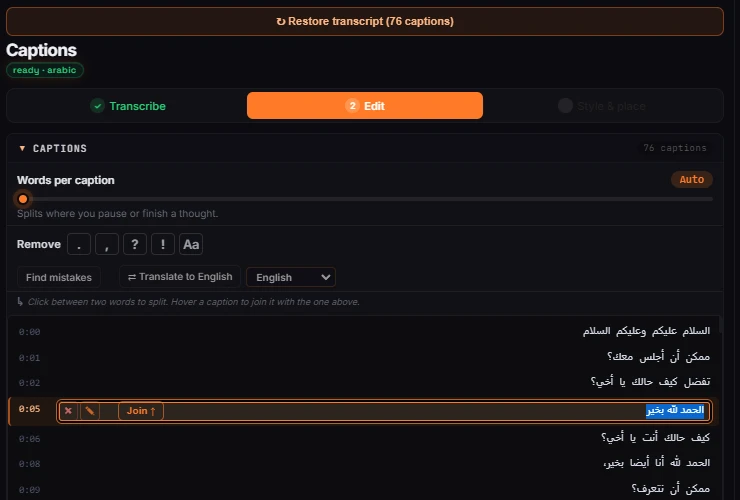
An hour of Arabic conversation is hard to edit by ear. As text, it becomes something you can skim in minutes: you find the quote you need, see where the answer starts and drop the parts that do not belong in the cut.
Editors turn Arabic audio to text for a few clear reasons:
A video with sound, a separate audio track or a voice recording. Anything Premiere can play.
Run the Arabic transcript in the FlowCut panel. The speech becomes text on your own computer.
Every word is timed to the audio. Set names and terms in your preferred spelling.
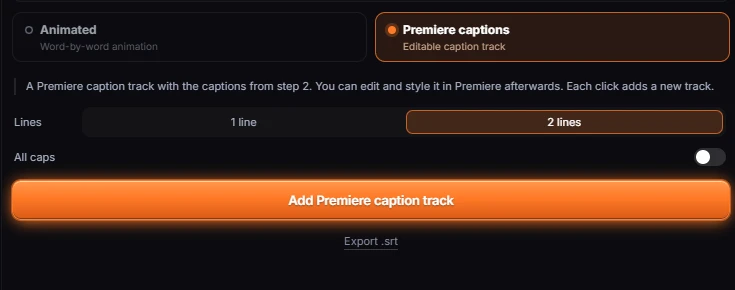
Place captions, cut from the text, or export an .srt with the timing kept.
| Situation | Smart move |
|---|---|
| Two people on separate microphones | Transcribe each speaker's track for clean quotes per person |
| Music and effects in the mix | Transcribe first, add the music after |
| Long recordings | Cut the silence first, so the transcript is tight and easy to skim |
| Names and brands | Set them once in the transcript, every caption follows |
The silence cutter sits in the same panel. Running it before you transcribe removes the long gaps and makes the text faster to read.
A plain text file loses the link to the audio. The FlowCut transcript keeps it: every line knows where it starts and ends in your sequence. That is what lets the same text become captions on the timeline or an .srt file without lining anything up by hand.
For short-form edits, the Arabic captions guide picks up from here. For everything about the transcript panel itself, see Arabic transcript in Premiere Pro.
Recorded Arabic is rarely formal. Interviews drift between Modern Standard Arabic and the speaker's own dialect, sometimes in the same sentence. The FlowCut Arabic pack covers Modern Standard Arabic plus Gulf, Levantine and Egyptian Arabic, so a podcast from Cairo and a talk from Dubai go through the same tool.
Turn your next Arabic recording into text
Free for three days, no card needed. Then $39 once, no limits on recording length.
Podcasts are where Arabic audio to text pays off most. A one-hour episode holds several moments that work as clips on their own, but finding them by listening takes as long as the episode. With the transcript open next to the timeline, the job changes:
The same text also gives you show notes, quotes for the episode description and a written record for guests who ask what they said.
FlowCut works on whatever sits in your sequence, so the source format is Premiere's job, not a separate converter's. Camera files, screen recordings, phone videos, WAV or MP3 voice notes, a separate recorder track synced to the picture: put it on a timeline and the Arabic audio can be turned into text. There is no file size limit to plan around and no conversion step before you start.
Interviews are easier to transcribe when each person has a microphone on a separate track. Transcribing the guest's track on its own gives clean text for quotes and captions, while the host's questions can stay out of the final cut entirely.
Online Arabic audio to text services ask you to upload the file and usually charge by the minute or by monthly credits. FlowCut works on your computer, so long recordings cost nothing extra and private interviews are never sent to a server. It is one payment of $39, which is why it is the Premiere Pro plugin with no subscription many editors keep installed for every job.
See the full feature list on the FlowCut plugin page, or go back to the Arabic transcript in Premiere Pro guide.
Yes. Put the audio on a sequence in Premiere Pro and transcribe it like any video.
There is no limit set by FlowCut. Long interviews and podcasts are transcribed on your computer without minute caps.
Yes. Export the transcript as an .srt file with the timing kept, ready for players, YouTube or a client.
Clear speech gives the best text. Transcribing before music and effects are added usually helps.
No. The audio is turned into text on your own computer.
Free for three days, no card needed. Then $39 once, no limits on recording length.
No card required. Just your email.