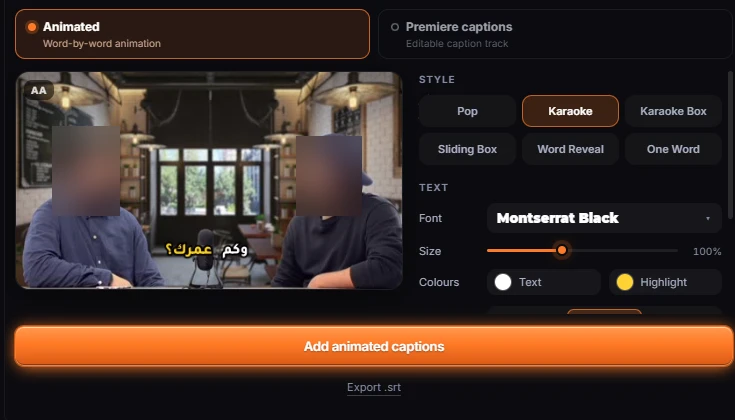
Style
Karaoke, Pop, Word Reveal and more
- Six animated styles
- Live preview on your own frame
- Right to left for Arabic
Animated Arabic captions that follow the speech word by word, right to left. Pick a style, set your font and colours, preview it on your own footage and place it on the timeline in one click.
No card required. Just your email.
On Reels, TikTok and Shorts most people decide in the first second, often with the sound off. Static subtitles tell them what is said. Animated captions show them when it is said: the word lights up as the speaker says it, and the eye follows the voice even without audio.
For Arabic this only works when the animation respects the language. Words have to appear in the right order from right to left, letters have to stay joined, and the highlight has to move in the direction an Arabic reader expects. FlowCut builds its animated captions around that.
| Style | What it does | Works well for |
|---|---|---|
| Pop | Words pop onto the screen as they are spoken | Energetic creator content |
| Karaoke | The full line is visible and the spoken word changes colour | Talking heads, interviews |
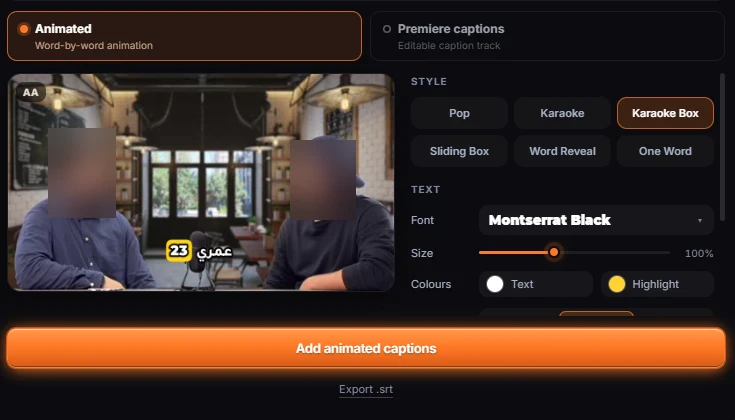
| Karaoke Box | A coloured box sits behind the word being spoken | Bold, high-contrast reels |
| Sliding Box | The box slides from word to word with the speech | Smooth, modern looks |
| Word Reveal | Each word appears in turn until the line is complete | Storytelling and quotes |
| One Word | A single word on screen at a time | Fast hooks and punchy edits |
Every style is laid out right to left for Arabic. Switch between them and the preview updates on your own footage, so you choose with your real shot, not a demo.
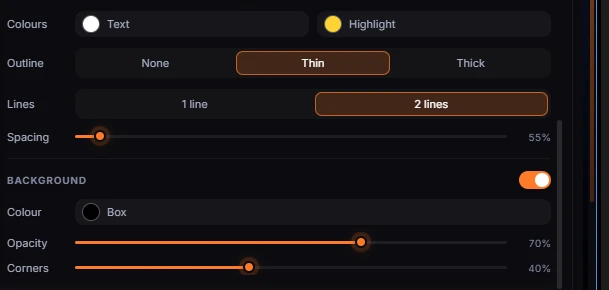
A style is only the start. Each one can be tuned in the panel:
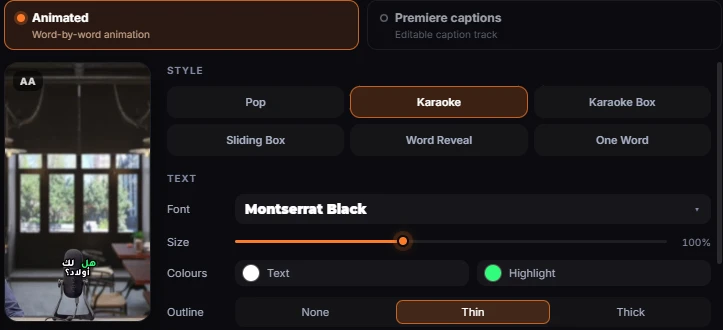
The preview follows the shape of your sequence. On a vertical sequence it shows the vertical frame, so you see exactly where the Arabic line will sit on a phone screen before anything is placed. Change the highlight colour, the size or the number of lines and the preview updates on the spot.
When you are happy, the same panel creates the vertical sequence for you with the optimised sequence generator, and the safe margins show where each platform puts its buttons.
Animated Arabic captions on your next reel
Try FlowCut free for three days, no card. Then $39 once with every style included.
Run the Arabic transcript on your sequence in the FlowCut panel.
Set names your way, choose words per caption and remove punctuation in one click.
Pick one of the six styles and adjust font, colours and layout with a live preview.
One click places them on your timeline, above your footage, in time with the speech.
The transcript step is explained in full in Arabic transcript in Premiere Pro, and the general rules for readable Arabic subtitles are in Arabic captions in Premiere Pro.
Animated captions are made for social video, where the movement keeps attention. For client deliveries, broadcasts and players that need a caption track, choose Premiere captions instead: an editable caption track in Premiere with one or two lines, or an .srt export. Both come from the same transcript, so you can make both versions of one video without transcribing twice.
Animated captions sit next to the silence cutter, the optimised sequence generator, safe margins, LUTs, overlays and viral text presets. That is the Premiere Pro plugin with no subscription FlowCut was built to be: $39 once, unlimited use, Mac and Windows. Everything it does is on the FlowCut plugin page, and the whole Arabic workflow starts at the Arabic transcript in Premiere Pro guide.
Yes. The Karaoke and Karaoke Box styles work in Arabic, with the spoken word highlighted as it is said.
Yes. Every animated style lays Arabic words out right to left and keeps the letters joined.
Yes. Choose any font in the panel. Arabic words fall back to an included Arabic font when yours has no Arabic letters.
Yes. The preview plays the chosen style on your own frame and updates as you change settings.
On your Premiere Pro timeline, above your footage, timed to the speech.
Try FlowCut free for three days, no card. Then $39 once with every style included.
No card required. Just your email.